AI Fundamentals: Prompts, Hallucination and Agents
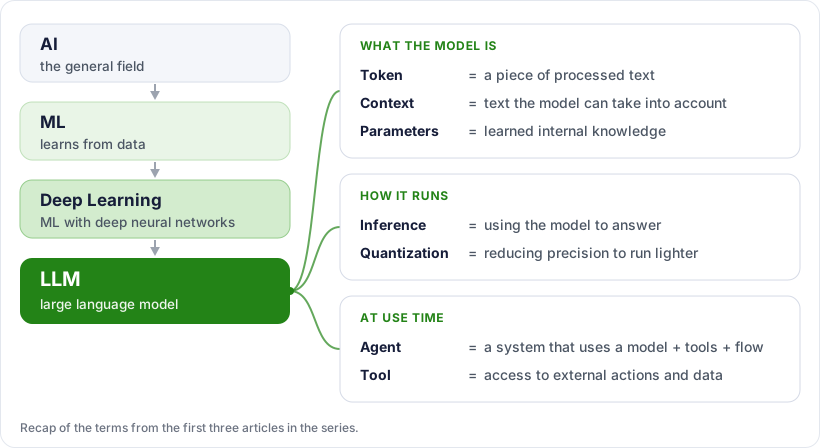
So far we have seen what an LLM is, what it is made of and how it is trained and run. This article covers what happens at use time: how the prompt influences the answer, why the model hallucinates, and how agents and tools solve part of that problem, going beyond just generating text. At the end there is a mind map that recaps the terms from the first three articles.
What is a prompt?
A prompt is the instruction or input sent to the model. It can be a question, a command, a code snippet, a document, or all of these together.
The quality of the answer depends a lot on the prompt, because the model uses that text as context to decide the most suitable continuation. A clear prompt reduces ambiguity and tends to improve the result.
Hallucination happens when the model answers with something that sounds convincing but is incorrect, made up, or not supported by real data.
This happens because an LLM is good at generating plausible language, not at guaranteeing truth on its own. That is why, for real tasks, many solutions use external tools, search, private knowledge bases or human validation.
What is an AI agent?
An AI agent is a system that uses AI to pursue a goal and carry out tasks in multiple steps. Instead of just answering a question, it can plan, break down the problem, use tools, look up external information and decide on the next step.
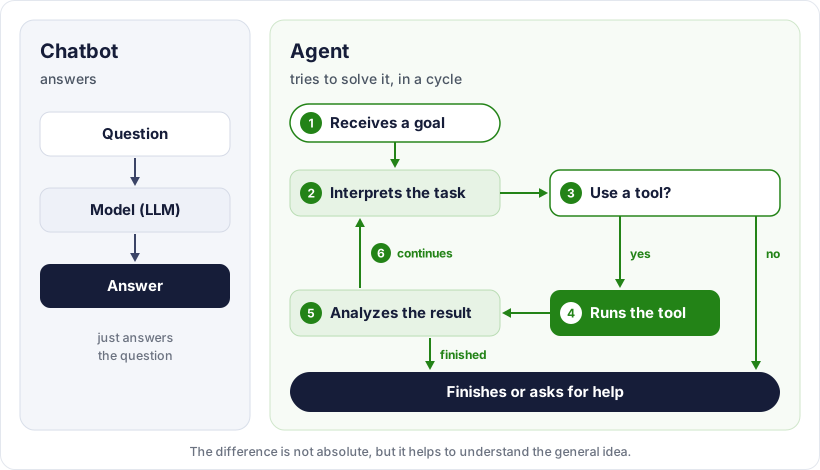
In simple terms: a chatbot answers; an agent tries to solve. This difference is not absolute, but it helps to understand the general idea.
How agents work:
Put simply, an agent usually operates in a cycle:
- Receives a goal.
- Interprets the task.
- Decides whether it needs to use a tool.
- Runs the tool.
- Analyzes the result.
- Continues until it finishes or asks for help.
Not every agent is highly autonomous. Some only make one or two external calls; others build larger flows with planning, execution and reassessment.
Tool calls
A tool is a function, resource or external integration that the agent can use to do something the model cannot do directly on its own. Common examples are web search, database queries, API calls, reading files and sending emails.
This matters because a pure LLM only generates text. To fetch up-to-date information, access a system or trigger a concrete action, it needs tools.
Common types of tools
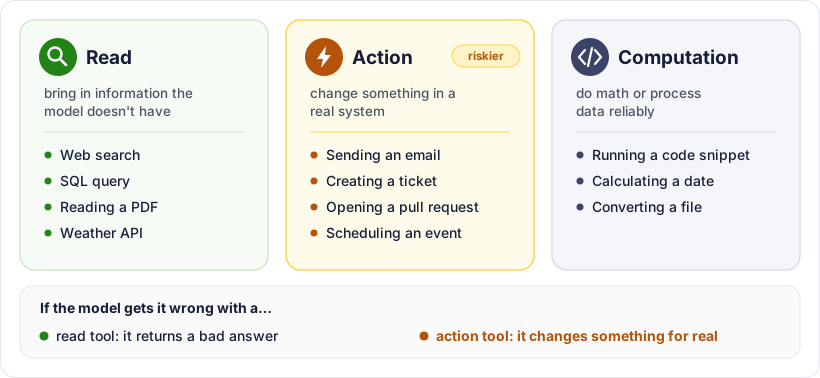
It helps to think in three groups:
- Read: they bring in information the model doesn’t have. Web search, a SQL query, reading a PDF, a call to a weather API.
- Action: they change something in a real system. Sending an email, creating a ticket, opening a pull request, scheduling an event.
- Computation: they do math or process data reliably. Running a code snippet, calculating a date, converting a file.
The separation matters because action tools are riskier. If the model gets a read tool wrong, it returns a bad answer; if it gets an action tool wrong, it changes something for real.
A concrete example
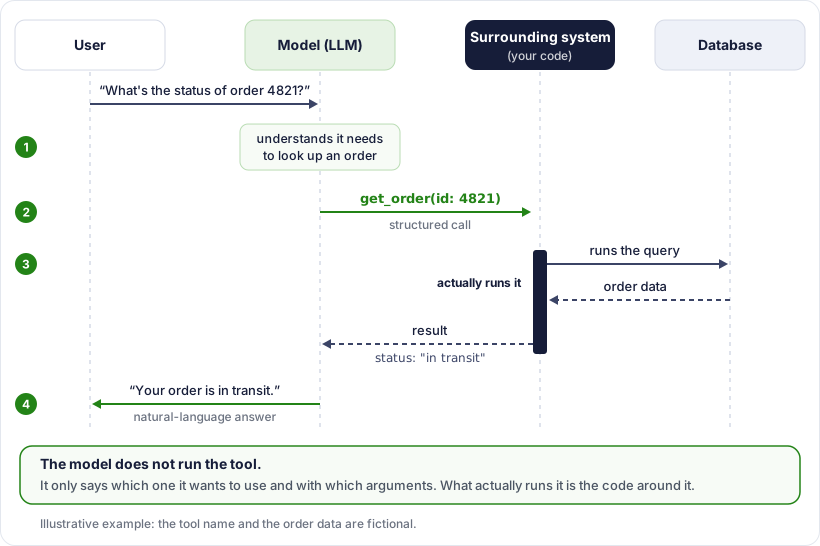
Question: “What’s the status of order 4821?”
An LLM on its own has no way to answer. It doesn’t access the database, and that order didn’t even exist when it was trained. With a tool, the flow looks like this:
- The model understands that it needs to look up an order.
- It emits a structured call, something like get_order(id: 4821).
- The surrounding system actually runs that call and returns the result.
- The model reads that result and writes the answer in natural language.
A detail that often goes unnoticed: the model does not run the tool. It only says which one it wants to use and with which arguments. What actually runs it is the code around it.
How the model chooses the tool
The model receives a list of the available tools, each with a name, a description and parameters. The choice comes from there, so a vague description often leads to the wrong choice.
- Bad: search — “searches for things”
- Good: get_order — “looks up the status and delivery date of an order by its number”
When the tool fails
A tool is no guarantee of getting it right. It can return an error, come back empty or bring outdated data. A well-built agent needs to handle this: try again, take another path or simply say it couldn’t do it. Without that handling, the model tends to fill the gap by making things up, which is exactly the hallucination described above.
Model vs Agent
The difference becomes clearer in this table:
| Concept | What it is |
|---|---|
| Model / LLM | The “brain” that understands input and generates text by predicting tokens. |
| Agent | The system that uses the model to achieve goals with steps, rules and tools. |
| Tool | The agent’s “hand” for querying, executing or interacting with external systems. |
Other terms worth knowing
Some terms come up all the time:
- NLP: natural language processing, the field focused on text and language.
- Neural network: a mathematical structure used to learn patterns from data.
- Attention: a mechanism that helps the model give weight to the most relevant parts of the context.
- Embedding: a numerical representation of text or other data that captures semantic similarity. It is the basis for semantic search and context retrieval.
- Fine-tuning: additional tuning of an already trained model for a specific task or domain.
- RAG: an approach in which the system retrieves external information before answering, reducing hallucination and bringing in more up-to-date data.
Some of these terms have their own article in this series. NLP is the topic of the next article, which is already published. Embedding, fine-tuning and RAG are left for future articles, because each one deserves a much longer explanation than fits here.
A simple mind map
A short overview:
- AI = the general field.
- ML = learns from data.
- Deep Learning = ML with deep neural networks.
- LLM = large language model.
- Token = a piece of processed text.
- Context = text the model can take into account.
- Parameters = learned internal knowledge.
- Inference = using the model to answer.
- Quantization = reducing precision to run lighter.
- Agent = a system that uses a model + tools + flow.
- Tool = access to external actions and data.